
Tiny Desk AI Video Generator
Your lead singer. Your friends. An Outstanding moment.
About this tool
Start your Tiny Desk AI parody with one lead singer photo. Expand the extra roles to add friends; we recommend up to three people in total. Keep the performance, desk-concert setting and source soundtrack.
Cast your Tiny Desk AI band
Start with one lead singer photo · JPG, PNG or WebP · up to 10 MB.
Lead singerRequired
Vocal and laughing close-up; starts around 5s.
Recommended trio: lead singer + keys + sax, for a clear three-person cast.
Add other performers (optional)
For extra roles, start with keys and sax. Empty roles keep their template performer; replacing 4–5 people can make identities harder to keep consistent.
KeysOptionalRecommended
Front row, at the red keyboard.
SaxOptionalRecommended
Solo close-up; select 13–15s to include it.
Backup · leftOptional
Back left from the viewer’s perspective.
Backup · rightOptional
Back right from the viewer’s perspective.
Use one clear face per photo, facing the camera, without sunglasses. At least 300 × 300 px. Empty optional roles keep the template performer. Use photos you have permission to use.
Vertical concert clip · source audio · fixed 15 seconds. The imported reference is 17.67s; this tool edits its first 15s, including the lead and sax close-ups.
2540 credits for this 15-second video, based on resolution. Extra cast photos cost no more. Failed or timed-out tasks return the charged credits.
Tiny Desk AI reference preview
Imported TinyDeskAI.video example with an AI cast, not a result generated on ImageLayered. Preview: 17.67s. Your output: the selected first 15s.
- 01Upload the lead first; expand to add friends, with up to three people recommended.
- 02Choose 15 seconds and 480p, 720p or 1080p.
- 03Download the original MP4 or a locally exported silent copy.
Explore the Tiny Desk AI performance
This imported example shows the desk-concert setting and role positions. It illustrates the idea, not the quality of an ImageLayered generation.
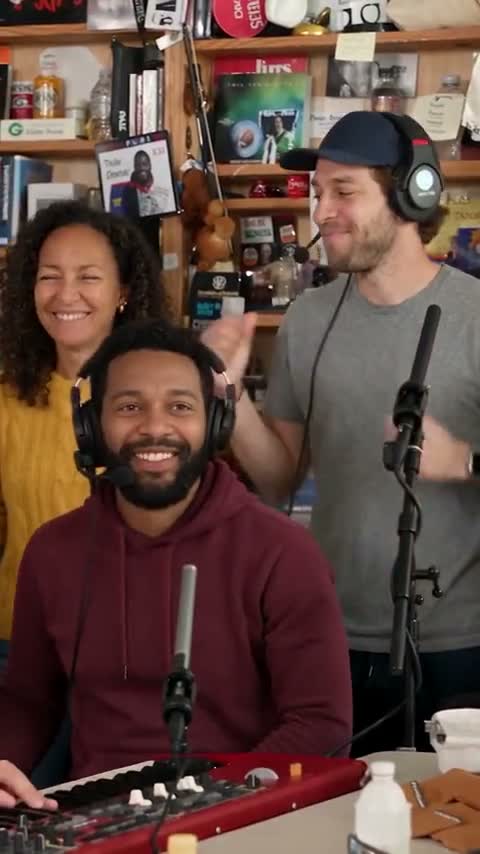
Band shot
Keys is in front; backing singers sit behind, left and right.
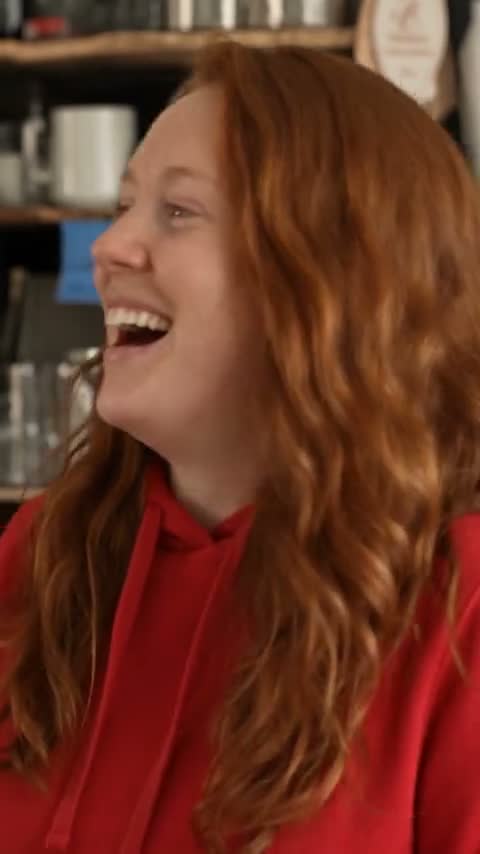
Lead close-up
The singer’s close-up appears around 5s into the template.
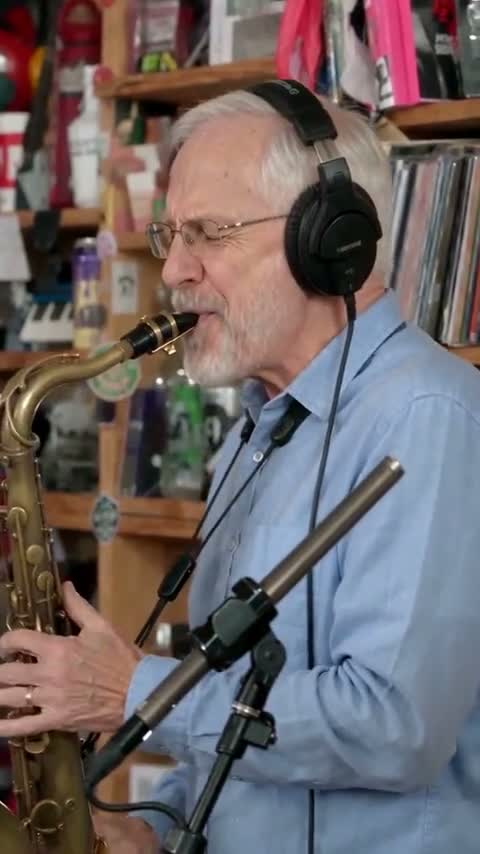
Sax solo
The sax close-up appears around 12s; short outputs will not include it.
Imported reference and motion source: TinyDeskAI.video
How Tiny Desk AI assigns your photos
Each upload has a specific seat in the performance. Leave a seat empty to keep its existing performer.
The lead photo belongs to the red-hoodie singer in the vocal close-up. Keys belongs to the front performer at the red keyboard; sax to the instrumental close-up. Backup left and right refer to the viewer’s perspective in the band shot. Tiny Desk AI keeps each assignment through the selected shots.
What is Tiny Desk AI?
Tiny Desk AI turns portrait photos into a playful desk-concert edit inspired by the Outstanding trend. This ImageLayered tool uses a fixed imported AI-cast clip, with your lead and optional friends assigned to its performers. It is an independent fan tool with no affiliation to NPR, Tiny Desk Concerts, Charlie Wilson or TinyDeskAI.video.
Create a Tiny Desk AI video in three steps
Choose your cast, select the clip and download the performance.
1. Choose your cast
Upload just the lead to start. Expand other performers to add friends; we recommend the lead plus up to two friends.
2. Set your clip
Choose the resolution. The fixed 15s output includes the lead and sax close-ups.
3. Download your video
Background generation continues if you leave. Return here or open Recent generations.
Your Tiny Desk AI studio
Photo roles, output controls and recoverable generation in one place.
Start with the lead
Replace only the lead by default. Expand to add optional roles. We recommend up to three people total; empty roles keep their original performer.
Original performance
Keep the source performance, cuts, instruments and desk-concert setting.
Three resolutions
Select 480p, 720p or 1080p before submitting.
Audio and silent copy
Source audio is preserved. Silent export removes the audio locally without a new generation.
Transparent credits
The quote follows resolution for the fixed 15s clip. Adding cast photos does not increase the price.
Recover your result
Tasks can resume after refresh. Completed videos are saved for 30 days.
Ideas for your Tiny Desk AI cast
Make a clearly labelled parody with photos you have permission to use.
Your friend group
Give each friend their own role and share a clearly labelled AI parody.
A solo performance
Upload only the lead portrait and keep the template band. The fixed 15s clip includes the lead close-up.
A team celebration
Create a lighthearted performance with permission from the people pictured.
Tiny Desk AI questions
What to upload, how much it costs and what your video includes.
What does Tiny Desk AI make?
Replace the lead with one photo by default. Expand other performers to add keys, sax or backing singers; we recommend up to three people in total.
Does Tiny Desk AI make the full 18-second video?
This tool outputs a fixed 15-second video, matching its 15-second source. The imported 17.67-second reference includes a final return-to-band shot outside the current generation template.
Can I change the Tiny Desk AI duration?
The current output is fixed at 15 seconds and follows the template duration, including lead and sax close-ups. Choose the resolution before submitting.
How much does Tiny Desk AI cost?
The default 15s at 480p costs 2540 credits; 720p costs 5080 and 1080p costs 12700 credits. Additional cast photos do not add a separate fee.
What happens to empty optional roles?
They retain the existing AI performer in the imported template. Only roles with uploaded photos are assigned replacements.
Can I download a silent Tiny Desk AI copy?
Yes. After generation, use Download silent copy. Your browser removes the audio locally without another generation or charge. Keep the page open during export. Music platforms may mute the original audio; no music licence is included.
What if generation fails?
Failed or timed-out tasks return their frozen charge once. You can resume a task after refreshing or reopening the page.
Where is my Tiny Desk AI result?
Download here or from Recent generations, where completed videos are retained for 30 days. Save a local copy before expiry.
Is this an official Tiny Desk service?
No. ImageLayered is independent and is not affiliated with NPR, Tiny Desk Concerts, Charlie Wilson or TinyDeskAI.video. Use authorised photos and clearly label AI parody edits.
Make your Tiny Desk AI concert
Bring a clear lead portrait and invite up to four friends into the performance.
Create my Tiny Desk AI video