Crazy Frog AI Video Generator
Pick a scene. Your face. Full chase.
About this tool
Crazy Frog AI Video Generator puts you on the invisible moped. Pick a scene, upload your rider and make the chase your own. Create your Crazy Frog AI video with the template’s camera moves, flip and original soundtrack.
2. Upload your Crazy Frog AI rider
One photo · JPG, PNG or WebP · up to 10 MB.
Your invisible-moped riderRequired
Choose one clear person or humanoid character, with the face and upper body visible. Use a well-lit image at least 300 × 300 px; avoid a covered face or a group photo.
108 credits for this Crazy Frog AI video. Failed or timed-out tasks refund the credits charged.
Your selected Crazy Frog AI template
Play the selected chase with sound. Your photo replaces its lead rider; the scene, chaser and soundtrack stay with the template. Use these scene previews to choose; generated results vary.
Template: Original overpass
- 01Choose a scene, then upload the person or character who will ride the invisible moped.
- 02Choose the duration and resolution, then review the credit price.
- 03Play your finished chase with sound and download the MP4.
Crazy Frog AI Video Generator scene templates
Explore Crazy Frog AI Video Generator scene previews with sound. These combine a user-provided supermarket clip with imported examples from other sources. The imported examples are not ImageLayered test outputs. Generated results vary.
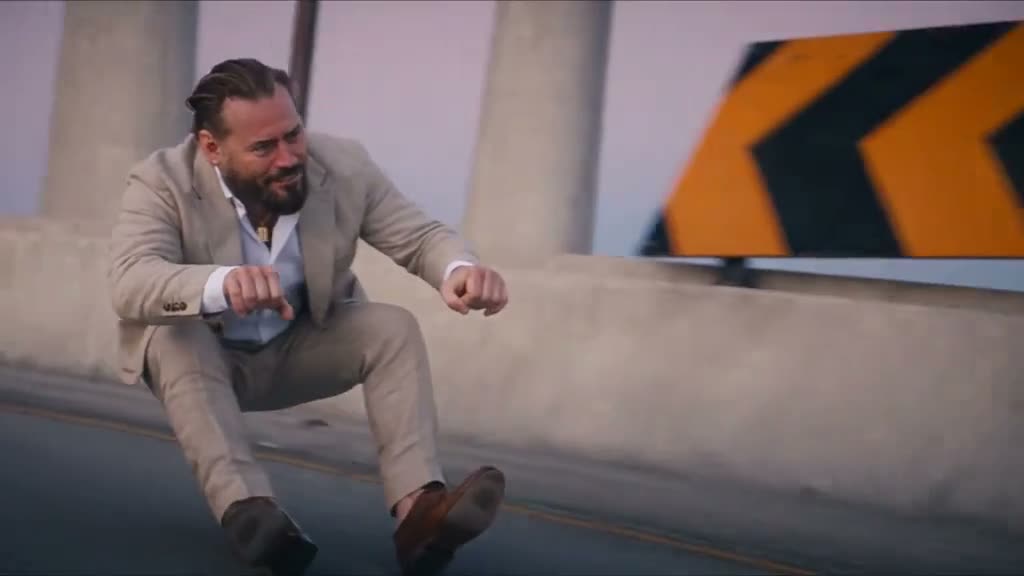
Ride without the bike
Crazy Frog AI Video Generator follows the crouched riding pose. Your rider holds imaginary handlebars while gliding down the concrete overpass.
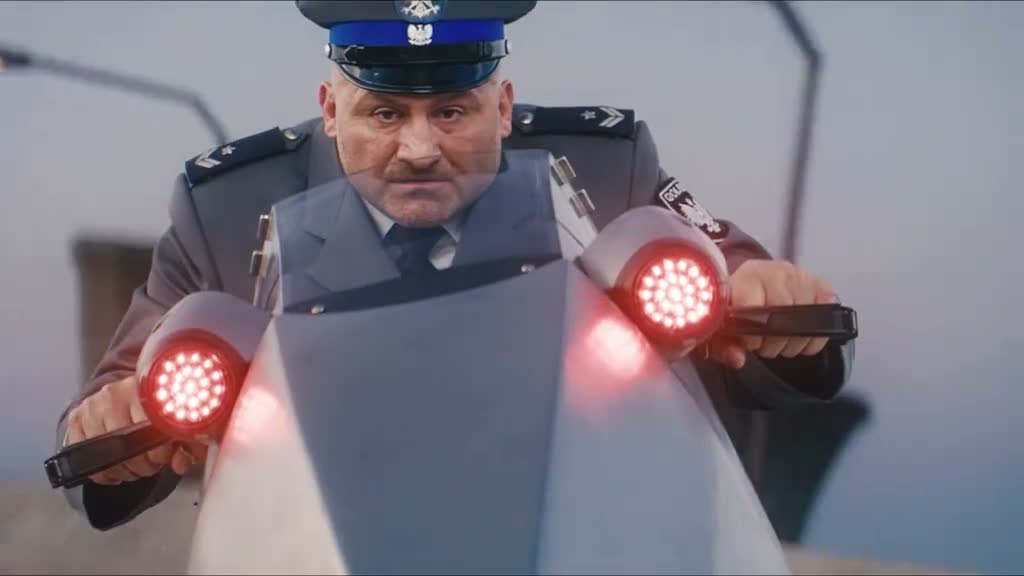
Keep the cop on your tail
Crazy Frog AI Video Generator keeps the pursuing officer and glowing hover-bike. Your photo changes the lead rider while the chase keeps its separate roles.
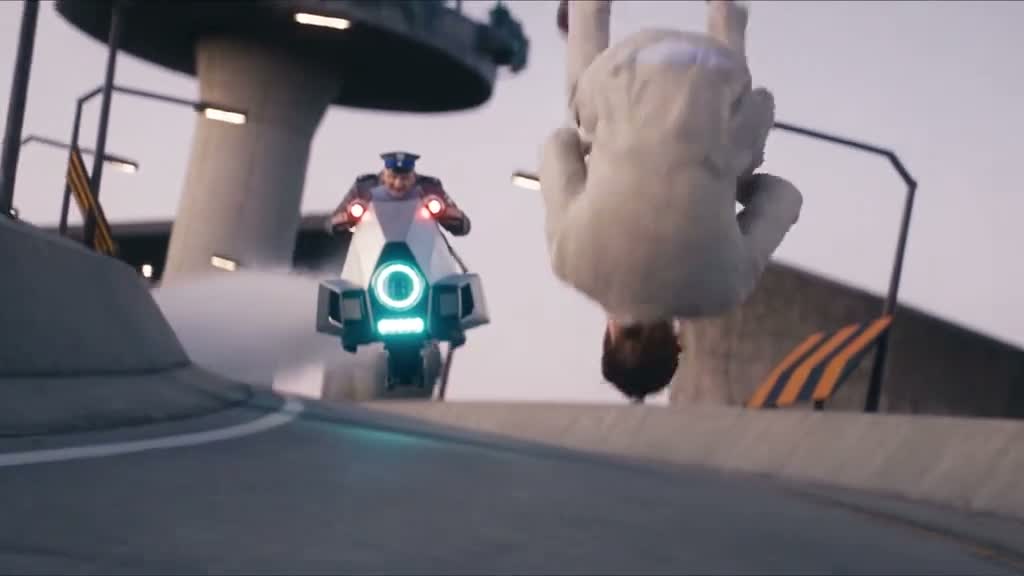
Commit to the flip
Crazy Frog AI Video Generator follows the airborne turn and landing in the full clip. Choose 14 seconds to include the complete chase sequence.
Give Crazy Frog AI Video Generator your look
Choose your scene first. Short appearance notes help Crazy Frog AI Video Generator keep your clothes and hair through the selected chase.
Keep my face, curly hair, blue jacket and white sneakers consistent in every shot. Follow the selected scene’s invisible-moped pose, backward glance, flip and landing. Preserve its chaser, surroundings and original soundtrack.
What is Crazy Frog AI Video Generator?
Crazy Frog AI Video Generator turns a portrait into the lead of a scene you choose. Select a template image to preview its chase, then upload your rider. Crazy Frog AI Video Generator replaces that rider’s identity and outfit while retaining the chosen scene, pursuing character, camera moves and sound. Faces, hands and the flip can vary; review your result before sharing.
How to use Crazy Frog AI Video Generator
Choose a template, add your photo and create a chase ready to play.
1. Pick your Crazy Frog AI scene
Choose a scene image in Crazy Frog AI Video Generator. Play its chase to see the background, pursuing character and action you will use.
2. Add your Crazy Frog AI rider
Upload one clear portrait and choose 5–14 seconds at 480p, 720p or 1080p. Crazy Frog AI Video Generator shows the complete credit price.
3. Watch your Crazy Frog AI chase
Play with sound and check the rider through the flip. Download the Crazy Frog AI Video Generator result or find it in Recent generations.
Inside Crazy Frog AI Video Generator
The invisible ride, the chase and your own recognizable appearance.
One photo becomes the rider
Crazy Frog AI Video Generator uses one image for the lead’s face, hair, outfit and character style. You do not need to film a riding performance.
An invisible moped
Crazy Frog AI Video Generator follows the low squat and outstretched hands. The missing bike is part of the scene, even while the rider turns and accelerates.
Seven scenes, seven chases
Crazy Frog AI Video Generator offers neon, chocolate, pixel, circuit board and more. Each template keeps its own scene transitions and pursuing character.
The selected scene’s soundtrack
Crazy Frog AI Video Generator requests the selected template’s existing audio. Listen to the finished MP4 and check the action against the sound.
Landscape video, three resolutions
Crazy Frog AI Video Generator follows the selected template’s 16:9 landscape framing. Choose 480p, 720p or 1080p before you start.
Recover after leaving the page
Crazy Frog AI Video Generator continues after submission. Return signed in within 24 hours to recover your latest task; finished videos stay available for 30 days.
Pick your Crazy Frog AI Video Generator rider
A distinctive face and a readable outfit make the recast your own.
Put yourself in the chase
Try Crazy Frog AI Video Generator with a bright selfie or upper-body portrait. Keep the eyes visible and leave room around the face.
Bring an original character
Use a humanoid mascot in Crazy Frog AI Video Generator. A clear face, outfit and distinct limbs help the character stay recognizable during the riding pose.
Make the outfit memorable
Give Crazy Frog AI Video Generator a portrait with a bold jacket or recognizable hairstyle. Short appearance notes can reinforce those details.
Crazy Frog AI Video Generator questions
Photos, timing, credits, audio and finding your finished chase.
What does Crazy Frog AI Video Generator make?
Crazy Frog AI Video Generator replaces the lead rider in your selected invisible-moped chase. Seven scene templates include the original overpass, neon city, supermarket, chocolate factory, pixel world, circuit board and Halloween.
How do I use Crazy Frog AI Video Generator?
Choose a scene image and preview its video, then upload one JPG, PNG or WebP. Select duration and resolution, check the price and start Crazy Frog AI Video Generator. Download the finished MP4.
Which photo works best in Crazy Frog AI Video Generator?
Use a well-lit face and upper body with one subject visible. Crazy Frog AI Video Generator accepts JPG, PNG and WebP up to 10 MB; the photo must be at least 300 × 300 px.
What changes in Crazy Frog AI Video Generator?
Crazy Frog AI Video Generator uses your photo for the rider’s face, hairstyle and outfit. The selected scene keeps its action, pursuing character, camera moves and soundtrack.
Can Crazy Frog AI Video Generator use my own character?
Yes. Try an original humanoid character with a clear face and outfit. Crazy Frog AI Video Generator can vary on unusual anatomy, especially hands and the upside-down part of the flip.
Can I choose a scene in Crazy Frog AI Video Generator?
Yes. Select one of seven image cards in Crazy Frog AI Video Generator. Each opens its own chase preview. Your uploaded photo replaces that template’s lead rider, while its existing pursuing character and scene remain. Some templates include overpass transitions.
Does Crazy Frog AI Video Generator keep the sound?
Crazy Frog AI Video Generator requests preservation of the selected template’s original soundtrack. Play your result with sound to check the track and movement together.
What duration does Crazy Frog AI Video Generator support?
Crazy Frog AI Video Generator supports 5–14 seconds and defaults to 14. Shorter results follow the opening of the selected template at its original pace; the full clip includes the later flip and getaway.
What resolution and shape does Crazy Frog AI Video Generator offer?
Crazy Frog AI Video Generator offers 480p, 720p and 1080p. The output follows the selected template’s 16:9 landscape framing to keep the original chase composition.
How much does Crazy Frog AI Video Generator cost?
The default 14-second, 480p Crazy Frog AI Video Generator task costs 108 credits. Duration and resolution update the price before generation. The charge covers the full input and selected output.
Can I leave Crazy Frog AI Video Generator while it works?
Keep the page open during upload and any free queue. After submission, Crazy Frog AI Video Generator runs in the background. Recover the latest task within 24 hours; finished videos are saved for 30 days.
What if Crazy Frog AI Video Generator fails?
A failed or timed-out Crazy Frog AI Video Generator task automatically refunds the credits charged. If the connection drops, recover the latest task before starting a new one.
Is Crazy Frog AI Video Generator official?
Crazy Frog AI Video Generator on ImageLayered is an independent creative tool, with no affiliation or endorsement from the Crazy Frog creators or rights holders. Use photos and audio you have permission to share.
Take off with Crazy Frog AI Video Generator
Choose a scene and upload your rider. Keep the moped imaginary and make your Crazy Frog AI video with sound.
Create my Crazy Frog AI video