
Goodbye GTA 5 AI Video Maker
One portrait. One last drive.
About this tool
Make your Goodbye GTA 5 AI farewell by the water. Receive a game case and car keys, say goodbye to three familiar companions, then drive into the sunset. Goodbye GTA 5 AI follows the complete 30-second story with your portrait.
Upload your Goodbye GTA 5 AI portrait
Your Goodbye GTA 5 AI photo guides the traveler’s face, hair and complete visible outfit. The three companions, waterfront and magenta car stay in the scene.
Your portraitRequired
For clothing replacement, use one clear adult waist-up or full-body photo showing your outfit, including sleeves and any jacket. A head-only photo cannot establish unseen clothing. JPG, PNG or WebP up to 10 MiB; at least 300 × 300 px.
1200 credits for the full Goodbye GTA 5 AI video. Failed or timed-out tasks refund the actual charge.
Preview the Goodbye GTA 5 AI farewell
Imported goodbyegta5ai.com scene reference, not an ImageLayered or Wan 3 test result.
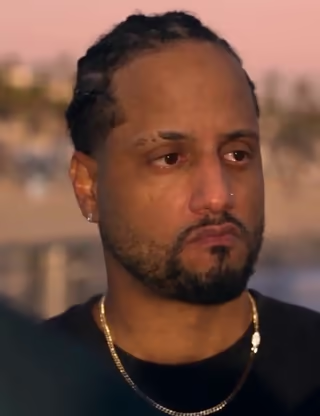
Traveler being replaced
Cropped reference frame. Your portrait takes this one role.
- 01Your portrait takes only the traveler’s role.
- 02The game case, key exchange and drive follow the reference.
- 03Keep or reopen this page to finish and save the full 30-second video.
Goodbye GTA 5 AI: a real result and the reference
Watch a complete 30-second Goodbye GTA 5 AI video generated on ImageLayered with Wan 3, alongside the original Goodbye GTA 5 AI scene reference. The reference footage still supplies the action and camera cuts for your video.
Goodbye GTA 5 AI · 30-second generated example
This Goodbye GTA 5 AI example is an earlier completed Wan 3 result from an ImageLayered test, shared with permission. It retains the source outfit; new Goodbye GTA 5 AI prompts explicitly request the clothes visible in your photo. Your result can differ.
Goodbye GTA 5 AI traveler reference
Your portrait replaces this traveler throughout the farewell.
Goodbye GTA 5 AI · Original scene reference
Game case, keys, one last goodbye and the sunset drive.
1 portrait · 30s
Goodbye GTA 5 AI reference: goodbyegta5ai.comGoodbye GTA 5 AI prompts, matched to each shot
The Goodbye GTA 5 AI prompts bind the correct traveler through every cut and explicitly request the clothing visible in your photo: garment type, color, neckline, sleeve length and outerwear. Back views, hand inserts and the driver’s seat use that same outfit. Trevor and the other companions remain protected. Read or copy both Goodbye GTA 5 AI prompts below.
Goodbye GTA 5 AI · Full farewell
How to make a Goodbye GTA 5 AI video
Create your Goodbye GTA 5 AI farewell in three steps.
1. Add a Goodbye GTA 5 AI portrait
Upload one sharp portrait with visible hair and clothing. Goodbye GTA 5 AI uses it for the departing traveler across close-ups and car shots.
2. Choose Goodbye GTA 5 AI quality
Select 480p, 720p or 1080p, review the full credit quote and start Goodbye GTA 5 AI. Your scene and shot-specific prompts are already prepared.
3. Save your Goodbye GTA 5 AI farewell
Play 2048 while waiting. Keep or reopen this page to finish the full 30-second MP4. Review and download your Goodbye GTA 5 AI video.
Goodbye GTA 5 AI questions
Portraits, scenes, the 30-second video and recovery.
What is Goodbye GTA 5 AI?
Goodbye GTA 5 AI is a fan-inspired waterfront farewell. Your portrait becomes the traveler receiving a game case and keys before leaving by car. It is not an official Rockstar Games product.
Who does my Goodbye GTA 5 AI portrait replace?
Your Goodbye GTA 5 AI portrait replaces the original black-shirted traveler with tied-back braids. Michael in the suit, Trevor in white and Franklin in green stay unchanged, even when they fill the foreground.
Does Goodbye GTA 5 AI include the whole 30 seconds?
Yes. Goodbye GTA 5 AI includes the handoffs, goodbye, driver-seat sequence and final departure. Wan 3 edits two 15-second parts; this page joins and saves one 30-second MP4. Keep or reopen the page to complete this step.
How much does Goodbye GTA 5 AI cost?
The full Goodbye GTA 5 AI video costs 1200 credits at 480p, 2400 at 720p or 4800 at 1080p. One portrait and both parts are included. Failed or timed-out tasks refund the actual charge.
Can I change the Goodbye GTA 5 AI script or companions?
Goodbye GTA 5 AI uses one prepared scene and one portrait slot. The built-in prompts follow its actual shots; separate cast, car, dialogue and script controls are not offered.
Will Goodbye GTA 5 AI keep my face and the original sound?
Goodbye GTA 5 AI requests your facial features, hair, visible accessories and the outfit shown in your photo, including its colors, neckline, sleeves and jacket layers. Use a waist-up or full-body photo for clothing. Source sound is preserved when available. Likeness, clothing, hands and transitions can vary; review your result.
Can I recover my Goodbye GTA 5 AI task?
Accepted Goodbye GTA 5 AI model work continues in the background. Recover your latest task within 24 hours and reopen the page for final assembly. Completed videos stay in Recent generations for 30 days.
Make your Goodbye GTA 5 AI farewell
Your portrait, the waterfront and one last drive. Start your full Goodbye GTA 5 AI video.
Create Goodbye GTA 5 AI