
Remaker AI Image Editor & Creator
Create images from text or edit photos with Seedream 5.5.
Sign in to generate. New accounts get 10 credits. Create from 8 credits or edit from 12 credits.
Text to image: 8 / 8 / 11 credits at 1K / 1.5K / 2K. Editing with one reference: 12 / 12 / 18 credits. Extra references increase the total quote.
Remaker AI examples from Seedream 5.5
Explore text-to-image ideas and before-and-after editing references. Switch tabs to compare the two workflows, then load an example prompt into the workspace.

Golden hour café
A cozy street-side cafe in Lisbon at golden hour, a barista handing a cup of coffee across the counter, warm natural light, blue azulejo tiles, a chalkboard menu written in English, photorealistic, shot on 35mm
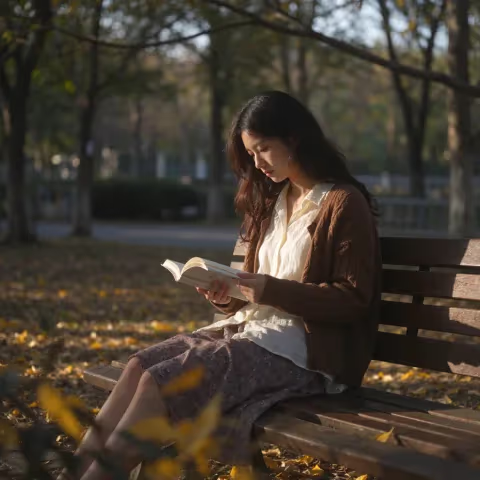
Autumn portrait
A young woman reading a book on a sunlit park bench in autumn, golden leaves on the ground, soft afternoon light, natural candid photo, photorealistic, shot on 50mm
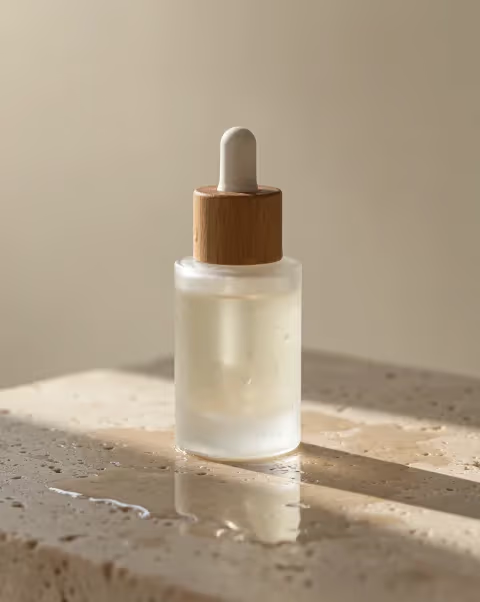
Product photo
A minimalist skincare product shot: a frosted glass serum bottle with a wooden cap on a wet travertine stone, soft morning light, water droplets, shallow depth of field, clean beige background, commercial photography
Official WaveSpeed reference examples from Seedream 5.5 text to image and Seedream 5.5 Edit. These are not outputs tested on ImageLayered. Your results will vary with your prompt and references.
How to use Remaker AI
Choose a starting point
Select Text to Image to create a new composition. If you already have a photo, upload, drop or paste it into the Remaker AI composer to switch to Edit Image. Try a preset for a starting prompt, then change the details to fit your project.
Describe what should change
Write a prompt with the subject, setting, lighting, composition and style. For edits, name the details to preserve as well as the change: for example, replace a plain background with a warm studio set while keeping the product shape, label and camera angle.
Review settings and create
Choose an aspect ratio, resolution, format and background. Add one to ten JPG, PNG or WebP references for editing, each up to 10 MiB. Check the credit amount shown on Generate, submit once, then inspect and download your image when it is ready.
What this Remaker AI workspace can do
Create from a written brief
Use the AI Image Creator to turn a subject, setting, mood and composition into a new still image. Write the visual priority first, then add details such as materials, camera distance, time of day and background. This Remaker AI creator flow sends the selected prompt and output settings to Seedream 5.5.
Edit a photo with references
Use the AI Image Editor when a source photo matters. Upload up to ten references and describe the requested change, then state what should stay recognizable. A reference guides the edit but does not guarantee exact faces, lettering or object geometry. The Remaker AI editor quote updates when resolution or reference count changes.
Prepare images for different layouts
Choose from fifteen aspect ratios for square product tiles, portrait posts, wide headers or panoramic scenes. A deliberate ratio gives the image a target canvas before generation and reduces avoidable cropping in the next design step.
Make transparent PNG assets
Select Transparent background and keep PNG to request an image with transparency. This can help with isolated objects, stickers and design elements. Inspect the edge against light and dark backgrounds before using it in a finished layout.
Image creation for everyday creative work
Remaker AI can support early visual exploration and practical image edits. Match the mode to the asset you already have.
Product concepts
Try the Remaker AI Image Creator to sketch a product scene from text, or upload a product photo to explore a different surface, setting or light. For an edit, ask to preserve the camera angle and specify which surface should change. Compare packaging text and product details against the original before publication.
Social and campaign drafts
Use Remaker AI to draft square, portrait or vertical campaign images. For a 4:5 product post, ask for the subject in the lower half with quiet space above for a headline. Check the image at the size it will appear in the feed, then add final copy in a design tool.
Portrait and style studies
Use a reference portrait to explore a new color palette, illustration treatment or background. Keep the request focused and compare the result to the source for unexpected changes to clothing, pose or identity. The Remaker AI editor is a prompt-guided starting point for these studies.
Standalone design elements
Create a subject on a transparent PNG canvas for a presentation, sticker or layout mock-up. Preview the cutout at its final size and inspect fine edges before sharing the file.
Remaker AI Image Editor FAQ
What is Remaker AI on ImageLayered?
This page is an ImageLayered AI image editor and creator entry point, powered by Seedream 5.5 text-to-image and editing endpoints. It is not an official Remaker service or an affiliation claim. Use it to create a still image from a prompt or edit uploaded references.
Can I use the Remaker AI image editor for free?
New accounts receive 10 welcome credits. Seedream 5.5 text-to-image starts at 8 credits for 1K or 1.5K and costs 11 credits at 2K. Editing starts at 12 credits with one reference at 1K or 1.5K. This is a limited credit-based trial, not unlimited free generation. View credit packages
How does the Remaker AI Image Editor handle reference photos?
Upload one to ten JPG, PNG or WebP references up to 10 MiB each and describe the intended edit. If you attach several references, name their roles in the prompt, such as using photo one for the product and photo two for the lighting. All references guide one result. Check that the generated image preserves the details you need.
What can the AI Image Creator produce?
Text to Image creates one still image from a written prompt. Seedream 5.5 offers 1K, 1.5K and 2K resolution, fifteen aspect ratios, PNG or JPG, and a transparent background when PNG is selected. It does not create video, GIF or SVG on this page.
How much does a Remaker AI edit cost?
The quote depends on resolution and the number of reference images. With one reference, editing costs 12 credits at 1K, 12 at 1.5K and 18 at 2K. Each additional reference adds cost. Check the complete quote before you submit.
Where do Remaker AI uploads and results go?
When you submit an edit, ImageLayered uploads your references to private storage and provides temporary access to WaveSpeed to run Seedream 5.5. Completed images are available in Recent generations for 30 days. Download a copy before expiry. Failed tasks refund the original charge. If your connection drops, check Recent generations before submitting again. Open Recent generations