
Sheru Bhai AI Video Generator
Your selfie. Sheru by your side.
About this tool
Upload one photo and step into a Sheru Bhai AI video: walk in together, throw money in the air, seal a deal or transform into the white-lion Don. Each scene comes with a detailed Sheru Bhai AI video prompt, ready for Wan 3.
2. Upload your selfie
One photo is required for every scene. Your face, hair and outfit replace only the sample human participant; Sheru stays the white lion beside you.
Your selfieRequired
Use a clear photo of one adult, with a visible face and the outfit you want to wear. Any adult gender works. JPG, PNG or WebP, up to 10 MiB; at least 300 × 300 px. AI likeness and hands may vary.
280 credits for this complete scene. Failed or timed-out tasks refund the actual charge.
See where your photo goes
AI reference clip from aisheru.com. Your photo replaces the sample human in the selected scene; this preview is not an ImageLayered or Wan 3 test result.
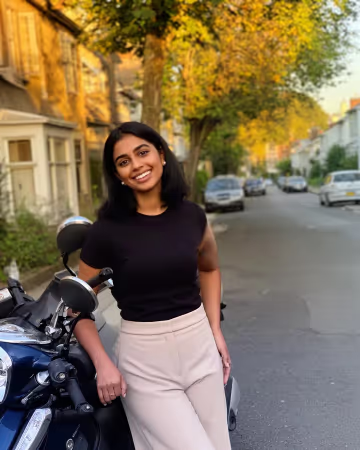
Sample person being replaced
Reference-site AI portrait. Upload your own photo to take this role.
- 01Choose one of four photo-powered actions.
- 02Upload your own portrait; only the selected human role is replaced.
- 03Check your identity, the interaction with Sheru and sound before sharing.
One photo. Four ways to join Sheru.
Each example pairs an AI sample portrait with a reference video imported from aisheru.com. The reference site attributes its clips to MiniMax H3 through YIR. These are scene previews, not ImageLayered or Wan 3 test outputs. Your photo is required for all four actions.
Reference input photo
Reference scene · your photo takes the role
Boss Entry
Your grand entrance, side by side at the hotel.
1 photo · 7s
Source: aisheru.com/video · imported AI example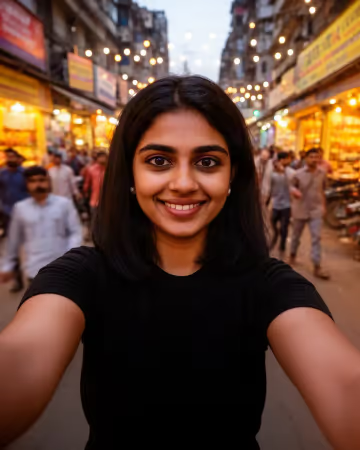
Reference input photo
Reference scene · your photo takes the role
Money Rain
Throw the notes as Sheru laughs beside you.
1 photo · 7s
Source: aisheru.com/video · imported AI example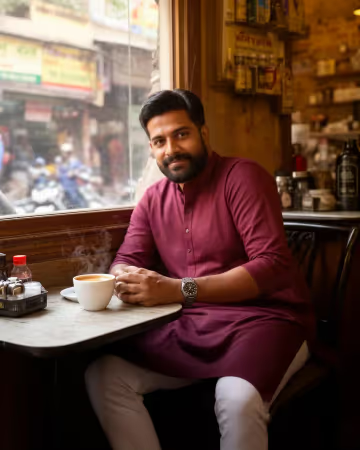
Reference input photo
Reference scene · your photo takes the role
Deal Done
Take the handshake seat opposite the white-lion Don.
1 photo · 7s
Source: aisheru.com/video · imported AI example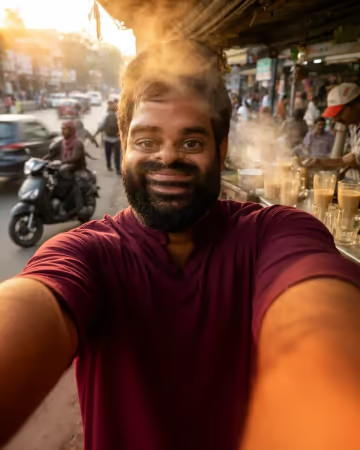
Reference input photo
Reference scene · your photo takes the role
Sheru Transform
Start with your selfie, end as the white-suited lion.
1 photo · 7s
Source: aisheru.com/video · imported AI exampleA detailed Sheru Bhai AI video prompt for every scene
The prompts bind your photo to the correct human: left in Boss Entry, right in Money Rain, left in Deal Done. Sheru’s face and white suit stay protected. Transform has its own human-to-lion scope. View or copy every full prompt below; source sound is preserved.
Boss Entry
Image 1 identifies the ONE human participant to insert into Video 1. Match the reference person's facial structure, eye shape and spacing, brows, nose, mouth, skin tone, apparent adult age, hairline, hairstyle, hair length, facial hair and visible personal accessories. Keep this one identity stable through profiles, motion, smiles, partial occlusions and changing camera distance. Replace the assigned sample human's entire visible appearance, hair, body proportions and outfit with the reference person's appearance and clothes, adapting the outfit naturally to the original poses. If trousers or shoes are absent from Image 1, extend the visible outfit coherently with plain neutral lower garments. Do not import the photo background. Preserve the source performance and gaze using the reference person's own anatomy. No pasted face, face blending, residual sample-person features, identity flicker or duplicate uploaded people. The reference person may be any adult gender; do not inherit the sample actor's gender or body shape. BOSS ENTRY, ONE CONTINUOUS ENTRANCE: Replace ONLY the dark-haired adult woman on the LEFT of the white lion, wearing a black short-sleeve top and beige trousers in the source. Image 1 becomes this human participant. At 0-2s the pair step out through the hotel's gold-framed glass doors; at 2-4s they walk toward the camera side by side; at 4-6.58s the camera sees them closer, smiling, still in their original left/right order. Keep the uploaded person's own outfit throughout, preserve their unhurried stride and natural arm swing, and keep their head and feet connected to the same body. Sheru stays to the human's RIGHT. Keep the door frame, chandelier lobby, entrance floor and camera approach. Exactly one reference-derived HUMAN and one original WHITE LION; never make a second Sheru or exchange their faces. PROTECTED SHERU: the large adult anthropomorphic white lion, full ivory mane, gold chain and wristwatch, tailored white three-piece suit. Preserve his exact source lion face, white fur, mane, muzzle, costume, accessories, body scale, gestures and expressions. Do NOT apply Image 1 to Sheru, turn him into the uploaded human, copy his lion head onto the human participant or swap their roles. Screen position is only a starting cue; follow the original human's identity throughout. Keep background bystanders unchanged. Edit the supplied Video 1; do not generate an unrelated scene. Preserve its original shot order, actual cuts, camera motion, framing, gestures, timing, light, shadows, furnishings, background people and prop trajectories. Generate seven seconds: follow the complete approximately 6.58-second source, then briefly hold the natural ending for the remaining fraction; do not add a new cut, plot beat or extra action. Keep both featured characters in the portrait framing, with their original positions and relative scale. Do not crop either face at the frame edges. Preserve the original audio track and its synchronization; do not invent new dialogue, a new speaker, new music or subtitles. Keep hands anatomically coherent, grip contact plausible, feet grounded, clothing temporally stable, reflections consistent, and objects in front of the correct person. No extra limbs, merged hands, transparent bodies, extra uploaded identities, added text, logos or watermarks.
Money Rain
Image 1 identifies the ONE human participant to insert into Video 1. Match the reference person's facial structure, eye shape and spacing, brows, nose, mouth, skin tone, apparent adult age, hairline, hairstyle, hair length, facial hair and visible personal accessories. Keep this one identity stable through profiles, motion, smiles, partial occlusions and changing camera distance. Replace the assigned sample human's entire visible appearance, hair, body proportions and outfit with the reference person's appearance and clothes, adapting the outfit naturally to the original poses. If trousers or shoes are absent from Image 1, extend the visible outfit coherently with plain neutral lower garments. Do not import the photo background. Preserve the source performance and gaze using the reference person's own anatomy. No pasted face, face blending, residual sample-person features, identity flicker or duplicate uploaded people. The reference person may be any adult gender; do not inherit the sample actor's gender or body shape. MONEY RAIN, ONE CONTINUOUS CELEBRATION: Replace ONLY the dark-haired adult woman in the black top standing on the RIGHT of Sheru, behind the foreground table. Image 1 is this human participant. At 0-1.5s the human holds a stack of fictional notes in both hands near waist level; around 1.5-2.5s the human lifts both arms and tosses the notes upward; around 2.5-4.5s the notes fall in front of and behind both characters while the human looks up smiling and the original lion laughs; around 4.5-6.58s the human lowers their arms as notes settle. Preserve the upload's identity even when notes briefly cover the face or hair, and re-reveal the SAME person afterward. Sheru stays on the LEFT, with his original lion face and white suit. Preserve the golden lantern street, bystanders, table, dishes and note movement; do not replace them with an office or invent readable currency designs. Keep the original throw trajectory and finger positions, without fused hands or banknotes glued to skin. PROTECTED SHERU: the large adult anthropomorphic white lion, full ivory mane, gold chain and wristwatch, tailored white three-piece suit. Preserve his exact source lion face, white fur, mane, muzzle, costume, accessories, body scale, gestures and expressions. Do NOT apply Image 1 to Sheru, turn him into the uploaded human, copy his lion head onto the human participant or swap their roles. Screen position is only a starting cue; follow the original human's identity throughout. Keep background bystanders unchanged. Edit the supplied Video 1; do not generate an unrelated scene. Preserve its original shot order, actual cuts, camera motion, framing, gestures, timing, light, shadows, furnishings, background people and prop trajectories. Generate seven seconds: follow the complete approximately 6.58-second source, then briefly hold the natural ending for the remaining fraction; do not add a new cut, plot beat or extra action. Keep both featured characters in the portrait framing, with their original positions and relative scale. Do not crop either face at the frame edges. Preserve the original audio track and its synchronization; do not invent new dialogue, a new speaker, new music or subtitles. Keep hands anatomically coherent, grip contact plausible, feet grounded, clothing temporally stable, reflections consistent, and objects in front of the correct person. No extra limbs, merged hands, transparent bodies, extra uploaded identities, added text, logos or watermarks.
Deal Done
Image 1 identifies the ONE human participant to insert into Video 1. Match the reference person's facial structure, eye shape and spacing, brows, nose, mouth, skin tone, apparent adult age, hairline, hairstyle, hair length, facial hair and visible personal accessories. Keep this one identity stable through profiles, motion, smiles, partial occlusions and changing camera distance. Replace the assigned sample human's entire visible appearance, hair, body proportions and outfit with the reference person's appearance and clothes, adapting the outfit naturally to the original poses. If trousers or shoes are absent from Image 1, extend the visible outfit coherently with plain neutral lower garments. Do not import the photo background. Preserve the source performance and gaze using the reference person's own anatomy. No pasted face, face blending, residual sample-person features, identity flicker or duplicate uploaded people. The reference person may be any adult gender; do not inherit the sample actor's gender or body shape. DEAL DONE, ONE SEATED TWO-SHOT: Replace ONLY the adult bearded dark-haired man in the burgundy long-sleeve shirt and light trousers seated on the LEFT, seen mainly in profile. Image 1 becomes this HUMAN; maintain its own facial geometry in profile rather than retaining the sample man's beard. Keep the uploaded person's own clothes, seated posture, gaze toward the lion and original arm position. At 0-1s the two lean forward into the right-hand handshake; at 1-4s they clasp hands naturally across the gap between the chairs; around 4-6.58s the original lion on the RIGHT lifts his head and opens his mouth in a celebratory roar while the human remains seated. Protect the lion's entire face, mane, suit and roar. Match only the human side of the handshake to Image 1, keeping exactly two separate hands with a plausible grip; do not replace the lion paw or grow another arm. Preserve both office chairs, desk behind them, chandelier, framed pictures, floor reflections and the stationary camera. PROTECTED SHERU: the large adult anthropomorphic white lion, full ivory mane, gold chain and wristwatch, tailored white three-piece suit. Preserve his exact source lion face, white fur, mane, muzzle, costume, accessories, body scale, gestures and expressions. Do NOT apply Image 1 to Sheru, turn him into the uploaded human, copy his lion head onto the human participant or swap their roles. Screen position is only a starting cue; follow the original human's identity throughout. Keep background bystanders unchanged. Edit the supplied Video 1; do not generate an unrelated scene. Preserve its original shot order, actual cuts, camera motion, framing, gestures, timing, light, shadows, furnishings, background people and prop trajectories. Generate seven seconds: follow the complete approximately 6.58-second source, then briefly hold the natural ending for the remaining fraction; do not add a new cut, plot beat or extra action. Keep both featured characters in the portrait framing, with their original positions and relative scale. Do not crop either face at the frame edges. Preserve the original audio track and its synchronization; do not invent new dialogue, a new speaker, new music or subtitles. Keep hands anatomically coherent, grip contact plausible, feet grounded, clothing temporally stable, reflections consistent, and objects in front of the correct person. No extra limbs, merged hands, transparent bodies, extra uploaded identities, added text, logos or watermarks.
Sheru Transform
Image 1 is the single uploaded adult identity for the human phase ONLY. Follow the transformation scope below. SHERU TRANSFORM, ONE PERSON BECOMES ONE LION: Image 1 replaces ONLY the initial human selfie subject and that human's visible appearance before and during the transformation. At approximately 0-0.4s show the uploaded person, recognizable, at the source market-street selfie angle with the original outstretched arm, using their own hair and clothes. Around 0.4-1.5s follow the source's magical golden smoke transformation: the SAME head progressively develops a white-lion muzzle, ivory fur and mane while the person's body, selfie pose and reference clothes remain connected. This is a deliberate gradual identity transformation, not a face-swap error; do not show a different sample human, a detached lion mask or two simultaneous people. Around 1.5-2s preserve the actual source cut to the palace-room full-body WHITE LION in the white three-piece suit and gold jewelry. From approximately 2-6.58s preserve that FINAL LION's original face, ivory mane, suit, body gestures and mouth movement. The final lion is the fictional Sheru, not a human wearing the uploaded person's face; do not reapply Image 1 after the transformation is complete. Preserve the original street-to-palace scene transition and the original audio; no extra transition, second companion or duplicated body. At all times exactly ONE featured character, first human, then transforming, then lion. Edit the supplied Video 1; do not generate an unrelated scene. Preserve its original shot order, actual cuts, camera motion, framing, gestures, timing, light, shadows, furnishings, background people and prop trajectories. Generate seven seconds: follow the complete approximately 6.58-second source, then briefly hold the natural ending for the remaining fraction; do not add a new cut, plot beat or extra action. Keep both featured characters in the portrait framing, with their original positions and relative scale. Do not crop either face at the frame edges. Preserve the original audio track and its synchronization; do not invent new dialogue, a new speaker, new music or subtitles. Keep hands anatomically coherent, grip contact plausible, feet grounded, clothing temporally stable, reflections consistent, and objects in front of the correct person. No extra limbs, merged hands, transparent bodies, extra uploaded identities, added text, logos or watermarks.
Who started the Sheru Bhai trend?
Sheru Bhai is a fictional white-lion Don shared through many AI clips. A first creator has not been independently established in the sources checked on 16 November 2026. The reference site discusses competing claims, including @digitalsheru and Digital Sheru; none by itself proves who uploaded the first clip.
How to make a Sheru Bhai AI video from your photo
Pick your moment with Sheru, upload a selfie and make it yours.
1. Choose your moment
Walk beside Sheru, celebrate in a money shower, shake hands or become the white lion. Every template uses your own photo.
2. Add your selfie
Upload one clear adult portrait. Choose 480p, 720p or 1080p, review the credit quote and generate with Wan 3. No prompt writing is needed.
3. Play, review and download
Play 2048 while waiting. Check your identity, hands, the interaction and original sound, then download MP4. Completed videos are saved for 30 days.
Sheru Bhai AI questions
Your photo, scene roles, prompts, pricing, sound and recovery.
What can I make with Sheru Bhai AI?
Upload one photo to join Sheru, the fictional white-lion Don. Boss Entry puts you beside him at a hotel entrance; Money Rain lets you throw fictional notes; Deal Done puts you in the handshake seat. Sheru Transform begins with your selfie and becomes the white lion.
How does the Sheru Bhai AI video prompt use my photo?
Image 1 identifies the human participant, not Sheru. Each built-in prompt specifies the source person, motion and identity constraints. It requests your face, hair and outfit throughout the human role while preserving the lion. Transform uses your identity only before and during the change to a lion. Full prompts are free to read and copy.
Who started the Sheru Bhai trend?
There is no independently verified first creator established by the sources checked for this page. The reference site lists competing attribution claims, including @digitalsheru and a Digital Sheru brand story. Treat these as claims rather than proof of the first upload; see the source links in the origin note.
Do all scenes need my photo?
Yes. All four current templates require one photo. Use a clear adult portrait with an unobstructed face; show the outfit you want in the human scenes. Your photo stays available when you switch templates, so you can try another action with the same upload.
How much does a Sheru Bhai AI video cost?
A 7-second video costs 280 credits at 480p, 560 at 720p or 1120 at 1080p, including your photo. The approximately 6.58-second input is billed as 7 seconds plus 7 seconds of output. Failed or timed-out jobs refund the actual charge.
Will I keep my appearance and hear the original sound?
In the three companion scenes, the prompt requests your own face, hair, accessories and outfit, with Sheru unchanged. Transform deliberately changes you into a lion and then uses Sheru’s white suit. The original reference sound is preserved; custom dialogue is not offered. AI may alter likeness, hands or motion, so review the result.
What happens while I wait?
Keep the page open through the upload and free queue. Once accepted, the task continues in the background. You can play the local 2048 game, recover the latest task within 24 hours and find completed videos in Recent generations for 30 days.
Make your entrance with Sheru Bhai
One selfie puts you in the scene. Pick your moment and join the white-lion Don.
Make my video with Sheru