ImageLayered · Blog
How to Make a Christmas Dance AI Video From Photos
Choose from four Christmas dance templates, upload one or two photos, assign the dancers and create a festive video. Preview every scene and learn the outfit rules, credit prices and download steps.
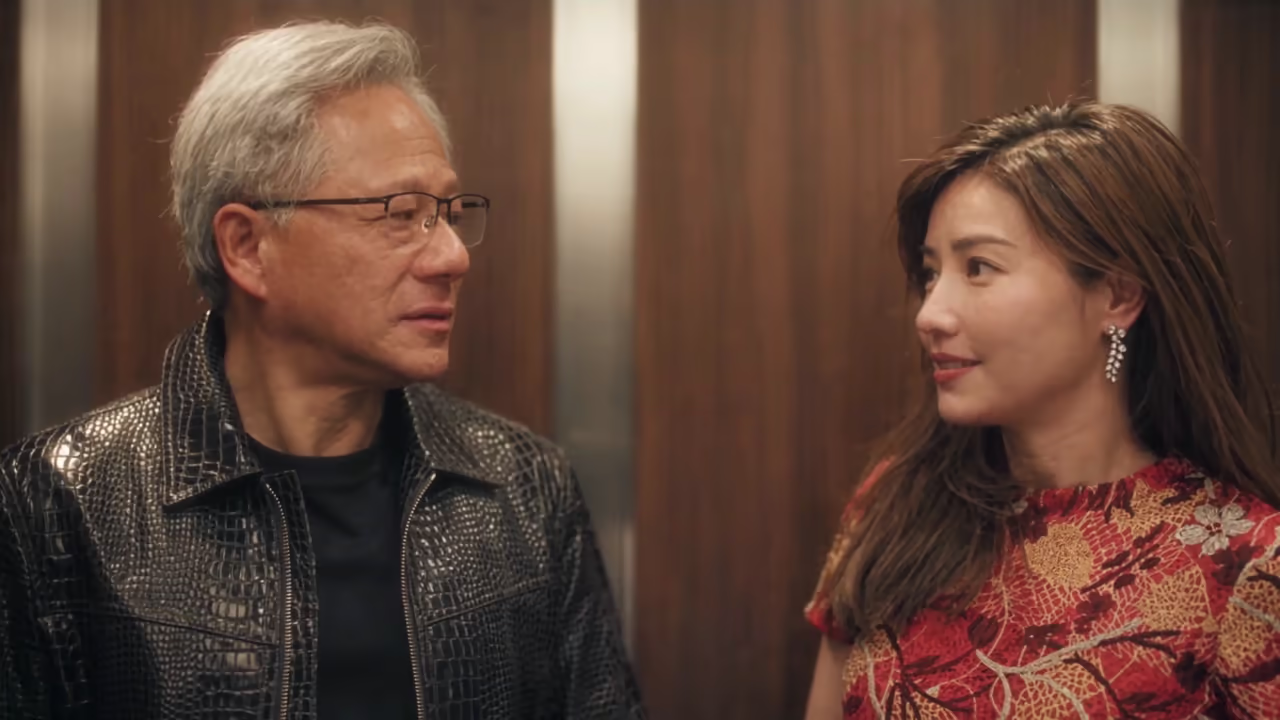
You can make a Christmas dance video without filming a routine or decorating a room. Choose a festive scene, upload a photo for each dancer, and let the video edit put your cast into the existing choreography.
ImageLayered’s Christmas Dance AI Video Generator offers four selectable templates: Couple Duo, Elf Dance, Christmas Party and Kitchen Duo. Two are solo dances; two are duets. Each selection uses its own source video and built-in prompt, so choosing a template changes the actual scene and role instructions.
This guide shows all four templates, explains the photo order and outfit rules, and walks through generation and download. The videos and stills below are imported original templates, not ImageLayered-generated results. Use them to choose the dance you want before uploading your photos.
Step 1: Choose your Christmas dance template
Start by watching the source clips. Your choice determines the setting, the number of photos you need and the output length. All four use vertical framing, with output resolution choices of 480p, 720p or 1080p.
| Template | Photos required | Output length | Outfit requested in the edit |
|---|---|---|---|
| Couple Duo | 2 | 15 seconds | Each person’s outfit from their photo |
| Elf Dance | 1 | 6 seconds | The original red-and-green elf costume |
| Christmas Party | 1 | 6 seconds | The person’s outfit from their photo |
| Kitchen Duo | 2 | 14 seconds | Each person’s outfit from their photo |
Couple Duo: a dance by the fireplace
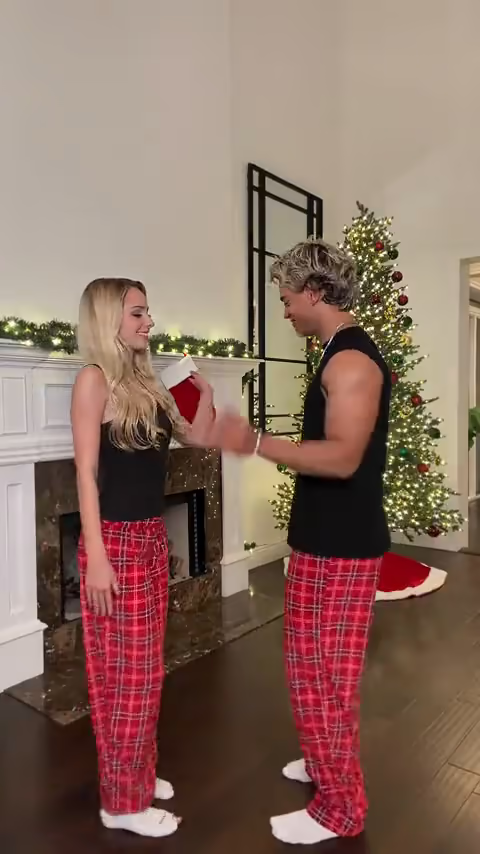
Couple Duo places two dancers beside a decorated Christmas tree and a fireplace with stockings. In the original, the woman begins on the left and the man begins on the right, both wearing black tops and red plaid pajama trousers.
Choose this template for a couple or two friends. Upload the person who should follow the initially left dancer as Photo 1, and the person who should follow the initially right dancer as Photo 2. The prompt requests their new faces, hair, body proportions and photo-defined outfits while preserving each dancer’s original movements.
Couple Duo source frame: Photo 1 maps to the dancer initially left; Photo 2 maps to the dancer initially right.
Elf Dance: become the dancer in Santa’s workshop
Elf Dance is a six-second solo routine in a wooden workshop filled with benches, toys, gifts and Christmas lights. It needs one photo, which replaces the central dancer’s identity and body proportions.
This template has a specific outfit rule: it keeps the green tunic, red collar and cuffs, belt, tights, pointed shoes and elf hat from the source. Choose a clear face photo; you do not need to own or photograph an elf costume. If keeping your own outfit is the priority, choose Christmas Party instead.
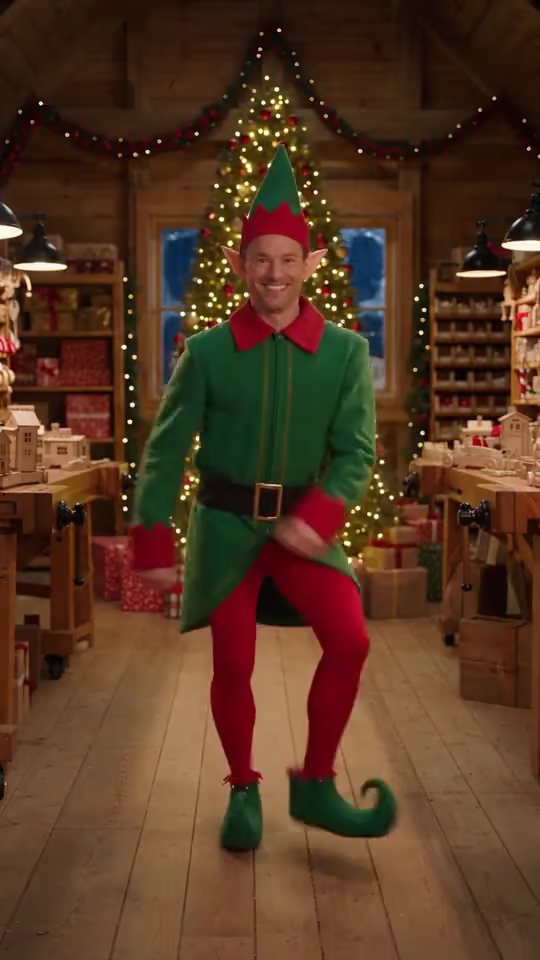
Elf Dance source frame. The edit requests your identity while retaining this festive costume.
Christmas Party: dance in your own outfit
Christmas Party is the other six-second solo option. Its source shows one dancer in a cozy living room, with a glowing tree and presents on one side and a fireplace with stockings on the other.
Upload one individual photo. Here, the prompt requests the face, hairstyle, body appearance, clothing and accessories from your reference. A photo that clearly shows your outfit gives the edit more useful information than a tightly cropped face alone.
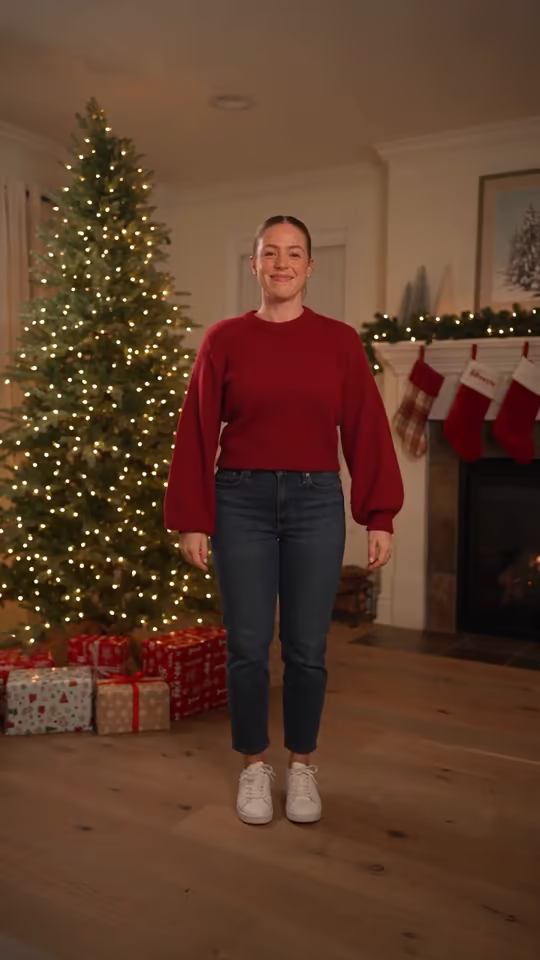
Christmas Party source frame. Your photo supplies the new dancer and outfit.
Kitchen Duo: a duet in a bright kitchen
Kitchen Duo follows two dancers in a kitchen with an island, bar stools and a tall window. The person initially on the left wears a dark gray top and pale printed trousers; the person initially on the right wears a red top and dark plaid trousers.
Use two separate photos, in the same left-to-right order as Couple Duo. Each reference remains assigned to its original dancer during turns, hand gestures and moments when the dancers overlap. The output is fixed at 14 seconds; the original preview below is slightly longer, at about 14.374 seconds.
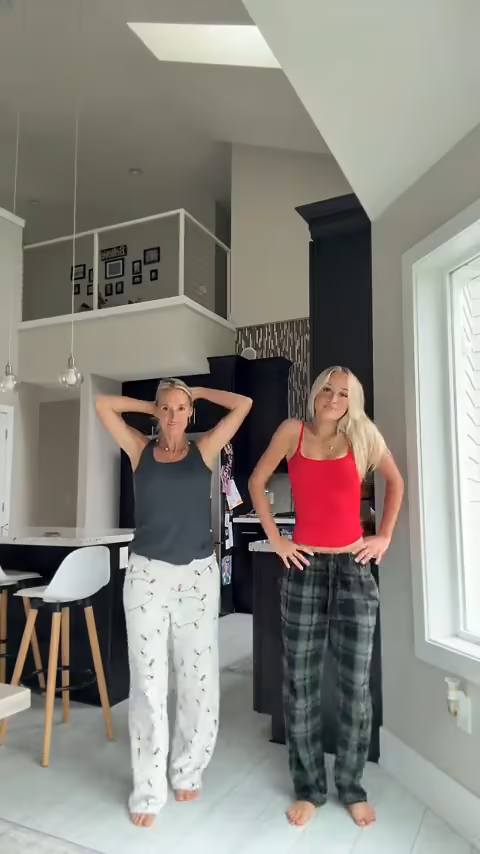
Kitchen Duo source frame: assign Photo 1 to the initially left dancer and Photo 2 to the initially right dancer.
The four originals were imported from christmasdanceai.com. That site credits the Couple Duo original to @notnataliereynoldss and the Kitchen Duo original to @everydaywithericksons, and describes its two solo originals as AI-generated. These source clips show the available scenes and choreography; they do not demonstrate a tested ImageLayered output.
Step 2: Prepare clear photos and assign the roles
Use one person per photo, with a clear face and visible hair. For the three templates that use photo-defined clothing, include the outfit you want to appear in the video. Avoid a face obscured by a mask, another person or a heavy filter.
Each upload must meet these requirements:
- JPG, PNG or WebP format.
- No more than 10 MiB per file.
- At least 300 × 300 pixels.
- A width-to-height ratio between 0.4 and 2.5.
The image requirements apply separately to both photos in a duet. Prepare two individual references rather than uploading a group photo and expecting the tool to decide who plays which role.
For a duo, “initially left” and “initially right” refer to the opening positions. The prompt follows each original dancer’s identity through later movement. If you want to reverse the casting, swap the photos before you submit.
Use photos you have permission to use and share. The tool’s photo inputs are for people; this workflow does not offer a separate pet-specific mode.
Step 3: Choose a resolution and check the credits
Open the Christmas Dance AI generator, select your template and upload the required photos. Switching templates updates the preview, photo count, fixed duration and quote together.
These are the configured prices for the current release:
| Template | 480p | 720p | 1080p |
|---|---|---|---|
| Couple Duo | 600 credits | 1,200 credits | 2,400 credits |
| Elf Dance | 240 credits | 480 credits | 960 credits |
| Christmas Party | 240 credits | 480 credits | 960 credits |
| Kitchen Duo | 580 credits | 1,160 credits | 2,320 credits |
Check the live quote beside the Create button before submitting. It includes every photo required by the selected template; there is no separate second-person fee.
480p is the least expensive option for trying a new reference. Higher resolutions provide a larger output, but they do not guarantee better identity consistency or fix an incorrect photo assignment.
Length follows the selected template. You cannot extend a solo clip to 18 seconds or choose an arbitrary output duration in this tool. The edit keeps vertical source framing, nominally 9:16.
Step 4: Generate and play 2048 while you wait
Sign in, check your balance and start the generation. You do not need to paste a prompt: each template already has instructions for its scene, cast and costume behavior.
The edit requests the source choreography, camera, setting and audio while changing the assigned dancer or dancers. It does not offer a custom song, dialogue or background selector.
Keep the page open during photo upload and the free queue. Once your task is accepted, it continues in the background. The generation area offers a 2048 game while you wait; playing does not pause the video task. When the result is ready, the area switches back to the video and download button.
If your connection drops after submission, use Recover my latest Christmas Dance AI video before starting another task. The tool can recover the latest task from the previous 24 hours. Completed videos remain in Recent generations for 30 days.
For a separate walkthrough, the button below the tool—Ask ChatGPT how to make Christmas Dance AI video—opens ChatGPT with the exact ImageLayered tool page and a request for factual, step-by-step instructions.
Step 5: Review the whole dance and download the MP4
Watch the result from beginning to end with sound. Check more than the first frame:
- Identity: the face stays recognizable during turns and partial occlusion.
- Role order: each duet dancer keeps the correct reference identity and individual movements.
- Outfits: Elf Dance retains the elf costume; the other scenes follow the corresponding photo’s appearance and clothing.
- Motion and setting: hands, feet, choreography and background remain coherent.
- Audio: the source soundtrack plays correctly through the clip.
The prompts request these behaviors, but AI video can still introduce changed faces, clothing errors or altered moves. Review the complete result before sharing it.
Download the MP4 when you are happy with the clip. Failed or timed-out tasks refund the amount actually charged; a completed generation with a visual imperfection is not automatically treated as a failed task.
Common questions
Do I need one photo or two?
Elf Dance and Christmas Party need one photo. Couple Duo and Kitchen Duo need two: Photo 1 follows the initially left dancer, and Photo 2 follows the initially right dancer.
Will the elf wear my clothes?
The elf template keeps its source costume. To request your own outfit in a solo scene, use Christmas Party and choose a photo that shows that outfit clearly.
Can I write a different prompt for each template?
The generator already uses a separate built-in prompt for every template. This page does not offer a custom prompt field. Choose the scene and photos that match the result you want.
Are these videos examples of finished ImageLayered generations?
No. They are the four original source templates, with still frames extracted from the same clips. Your photos are applied when you create a new video.
Where do I start?
Choose your dance in the Christmas Dance AI Video Generator, upload the required photos in role order, check the quote and create your video.