
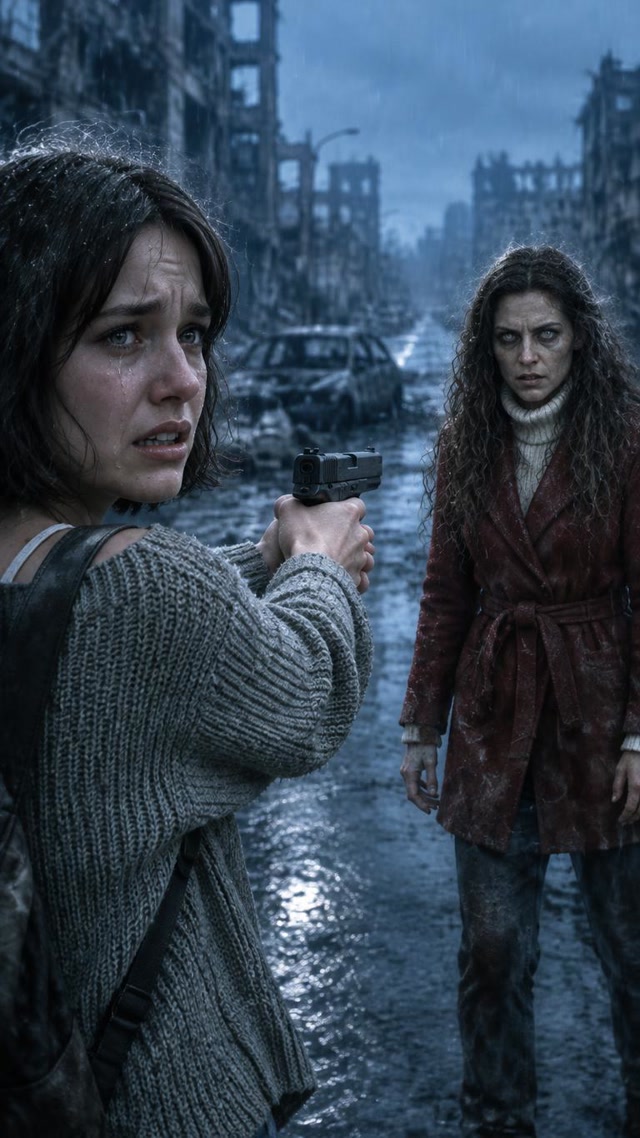
A zombie couple video turns two portraits into a short AI love story: one person appears infected, the other recognizes them, and a frightening encounter gives way to a memory of the two people together. The emotional change matters as much as the zombie makeup.
You can make this format with the ImageLayered AI Zombie Video Generator. Upload one photo for the zombie character and one for the survivor, check the roles, and keep the page open while the complete video is created. The current template produces an approximately 24-second, 9 vertical MP4 at 480p with AI-generated sound, for 80 credits.
Watch a real zombie couple video example
This example was generated for ImageLayered using two separate reference photos. It shows the template's rainy-city encounter and warm beach memory. Your photos guide the characters, but facial details, movement and shot timing can vary between generations.
The sample is a useful reference for the style and output quality before you spend credits. It is an example of this workflow, not a promise that every face or gesture will match it exactly.
What makes the zombie couple video work?
A zombie face filter changes a portrait. A zombie couple video gives two recognizable people a relationship and a choice. The viewer first sees danger, then recognizes what the survivor stands to lose.
ImageLayered uses a fixed city-to-beach story:
| Part | What the story is designed to show | Visual direction |
|---|---|---|
| Cold encounter | A survivor faces their infected loved one, struggles to act, lowers the weapon, and sees the zombie rush forward | Rain, a ruined city, blue-gray light and tense close-ups |
| Warm memory | A hard cut reveals the same two people healthy, embracing, smiling, running together and watching the sunset | A beach, golden light and affectionate movement |
The contrast lets the second half feel like a memory of the relationship. It does not depend on a gradual face-morph transition. The two sections are joined with a hard cut, and individual shots can differ from the intended sequence.
Some versions of the trend use a wheat field, snow, or an abandoned room. This generator currently personalizes one rainy-city-to-sunset-beach template. Those other settings are not selectable options here.
Which photo becomes the zombie?
In ImageLayered, the first photo becomes the zombie character. The second photo becomes the survivor. Use the Swap roles button before generating if you want to reverse them.
| Upload slot | Role in the city | Role in the beach memory |
|---|---|---|
| First photo — zombie character | The person with the infected appearance who approaches the survivor | The same person, restored to a healthy appearance |
| Second photo — survivor | The person struggling with the encounter and lowering the weapon | The same person, healthy throughout |
Follow the named upload slots rather than assuming a permanent left or right position. Camera angles can reverse. Other generators may use a different upload order, so a tutorial written for another site is not a reliable guide to our two slots.
The template supports two adults. You can cast partners, friends or adult family members using photos you have permission to use. Pet photos are not supported by this template.
Choose photos that give both faces a clear reference
You do not need to photograph both people together or in matching locations. Each photo should make one person's face easy to identify.
| Choose | Avoid | Why it helps |
|---|---|---|
| A sharp head-and-shoulders or waist-up portrait | A distant full-body photo with a tiny face | The model has more visible facial detail to work with |
| Even lighting and visible eyes | Sunglasses, deep shadows or a hand covering the face | The face stays readable before and after the zombie makeover |
| One adult per image | A group photo with several possible subjects | Each role has a clear reference |
| Natural facial features and a visible outfit | Strong beauty filters, motion blur or heavily compressed screenshots | The model gets a more consistent identity and clothing reference |
Supported input formats are JPEG, PNG and WebP, up to 20 MB per photo. If your only image shows both people together, crop each person into a separate reference, provided each crop still has a clear face. If the crops are blurry, use different portraits.
How to make your zombie couple video
1. Open the generator and sign in
Go to the AI Zombie Video Generator. Check your balance and the price displayed next to the generation button. The current complete-video price is 80 credits; being on a free account does not make this an 80-credit free generation.
2. Upload the zombie character first
Place the person who should appear infected in the zombie character slot. Upload the other person in the survivor slot. Review both thumbnails and swap the roles if needed.
You do not need to write a prompt. The template supplies the setting, character roles and story direction. The current page does not offer custom scenes, selectable video lengths or a 1080p tier.
3. Start generation and keep this page open
The tool creates character references and the two video sections, then assembles the final MP4. Keep the generator page open until the completed result appears. Avoid letting the device sleep during the process.
If interrupted, return while signed in within 30 minutes of starting and check the latest task. Check its status before submitting another video. Server-side generation can continue, but connecting the scenes and assembling the final file still requires your browser.
Free accounts join the queue; paid accounts skip it. Either way, the account needs enough credits for the generation. Completion time depends on the queue, generation and your device's processing, so there is no fixed finish time to promise.
4. Review the whole video, then download
Watch the cold encounter, the transition and the warm memory. Check that each role remains recognizable, both characters appear healthy in the beach section, and hands, faces and props look acceptable throughout.
Download a local copy of the MP4. Completed output is also available in Recent generations for 30 days. Saving a local copy is the safest way to keep it beyond that period.
Template or a manual two-clip workflow?
A template is useful when you want this specific zombie couple video story without writing prompts or joining separate files yourself. ImageLayered generates two sections internally and assembles one downloadable video in the browser.
A manual workflow gives you more editorial decisions: create a cold scene and a warm scene in a general video tool, then align the shots in an editor. It also makes you responsible for carrying identities, clothing and the transition across separate outputs. If you want to explore custom scenes, our image-to-video tool is a separate starting point; it does not automatically reproduce this complete template.
The practical choice is about control: use the zombie generator for its built-in story, or build a custom sequence when you want different locations and cuts.
Fix common zombie couple video problems
The zombie and survivor roles are reversed
Check the named slots before starting: first is zombie, second is survivor. Swapping the thumbnails changes the roles for the next generation. It does not rewrite a completed video.
A face changes between the city and beach
Try a clearer, closer portrait with visible eyes and fewer filters. Face matching can still vary during motion, close contact and changes in lighting. Review the result rather than expecting an exact likeness in every frame.
Generation appears stuck or the page was closed
Reopen the generator while signed in and use Check my latest video before starting again. Return within the task's 30-minute window so the browser can finish the remaining stages. Failed or timed-out tasks receive a refund of the credits actually charged.
The video looks soft on a large display
The current output is 480p. Exporting it into a higher-resolution editing project does not restore missing source detail. Check the example at the viewing size you intend to use before generating.
I want music at the warm transition
The MP4 includes AI-generated sound, not a guaranteed song or continuous musical score. You can add music you are allowed to use in your editor or posting app. Place the emotional change near the cut to the beach, and listen to both sections before sharing.
Frequently asked questions
Do I need two photos for a zombie couple video?
Yes. This template needs one reference for each adult role. A single group photo must be split into two clear portraits before upload, or replaced with two separate photos.
Can I change the background or write my own zombie prompt?
Not in this template. It uses a fixed rainy-city encounter and sunset-beach memory. For custom prompts and scenes, use a general video generator and plan the shots separately.
How much does a zombie couple video cost?
The current ImageLayered price is 80 credits for one complete video, including both sections and assembly. Check the current price on the tool before starting. Failed or timed-out tasks receive a full refund of the credits charged; an AI detail you dislike in a completed video is not the same as a technical failure.
Is the output 1080p, and how long is it?
The current template outputs an approximately 24-second, 9 vertical MP4 at 480p. Exact duration can vary slightly. The example above is about 24.2 seconds.
Is the zombie couple video frightening?
It includes a weapon, zombie makeup, a sudden approach and a scream before the warm memory. The template is written to avoid gunfire, bites, blood and gore. Preview the result before showing or sharing it with others.
Can I use pets or children in this template?
This version is designed for two adults. Pet photos are not supported. Use adult portraits you have permission to use and check both roles before generating.
Where do I find a completed video later?
Open Recent generations while signed in. Completed videos are retained there for 30 days. Download a local copy before they expire; unfinished task recovery and completed-file retention are different time windows.
Further reading
For other approaches to the format, see Kavel's zombie AI trend guide and Viberot's AI zombie couple tutorial. These are separate products with their own role order and settings. The instructions, price and specifications in this article describe ImageLayered.
Ready to cast your two characters? Create your zombie couple video after checking the example and upload roles above.
About the author
ImageLayered Team
The ImageLayered team builds AI image and video tools and documents their workflows using generated examples.